RAR Resource Uploader Guide
The RAR Resource Uploader is a tool designed to help developers upload and manage their game resources efficiently. Below is a detailed guide on how to use this tool correctly.
Tool Overview
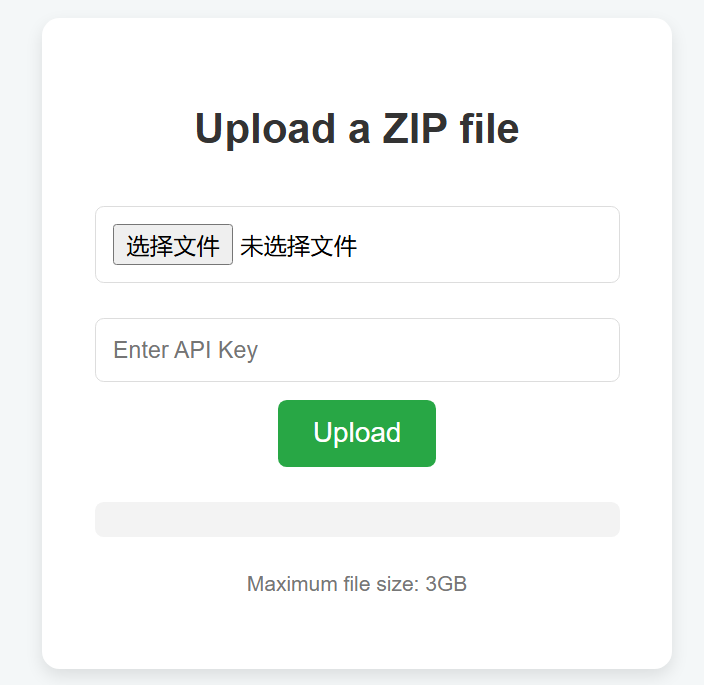
This tool allows users to upload ZIP, RAR, and other compressed files. It strictly prohibits the upload of EXE, BAT, or any other potentially malicious scripts to ensure security.
Website URL: RAR Resource Uploader
Website URL: RAR Resource Uploader
Website URL: RAR Resource Uploader
Supported File Types
- Compressed Files: ZIP, RAR
- Media Files: Videos, Text, Images
- Game Assets: Unity3D packaged files
Any file exceeding 3GB will not be uploaded.
How to Upload a RAR Resource
- Select Your File: Locate the RAR or ZIP file you want to upload.
- Enter Your API Key: Provide your unique API key for authentication.
- Click Upload: Once uploaded successfully, you will receive a resource URL where your file is stored.
This URL can be used directly to integrate with your game, such as linking to maps or assets.
Updating an Existing File
- To update a resource, simply upload a new RAR file with the same filename.
- The new upload will automatically overwrite the previous version.
Important Notices
- Testing & Development Only: This service is provided for testing purposes only. Do not store official or critical resources here.
- Short-Term Storage: While there is no strict time limit, long-term storage is not guaranteed. Future policies will be announced.
- Security: Ensure your uploads comply with security guidelines and do not contain malicious content.
- Developer Access Only: This tool is for verified developers only. Do not misuse the platform.
By following these guidelines, you can efficiently manage your Unity3D assets using the RAR Resource Uploader.