Map Uploader Guide
The Map Uploader is a tool designed to help developers configure and upload their game maps efficiently. Below is a detailed guide on each input field to ensure correct usage.
Tool Overview
Here is the interface of the Map Uploader:
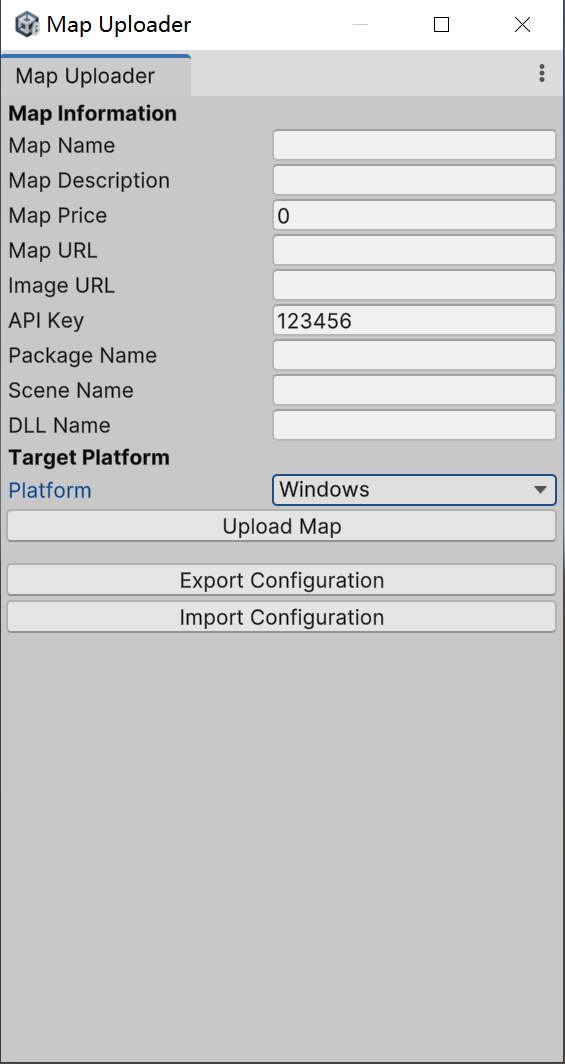
Input Field Explanation
1. Map Information Section
- Map Name: The name of the map you want to upload. This will be displayed to users on the platform.
- Map Description: A brief description of the map. Use this field to highlight features or unique aspects of the map.
- Map Price: The price of the map in your preferred currency. If the map is free, set this value to
0. - Map URL: The URL pointing to the map's resource file. Ensure the URL is valid and accessible.
- Image URL: The URL of an image representing the map. This could be a thumbnail or screenshot.
- API Key: Your unique API key for authentication. Ensure this field is correctly filled; otherwise, the upload will fail.
- Package Name: The name of the map's package, typically used for internal identification.
- Scene Name: The name of the scene in your Unity project associated with this map.
- DLL Name: If the map uses specific compiled code, provide the DLL name here.
2. Target Platform Section
- Platform: Select the target platform for the map. Available options include:
- Windows
- Android
- iOS
- WebGL
Ensure the selected platform matches the intended audience of the map.
Buttons
1. Upload Map
Click this button to upload the map with the provided configurations. Ensure all fields are correctly filled before proceeding.
2. Export Configuration
Use this button to export your current configuration settings. This is useful for backup or sharing with team members.
3. Import Configuration
Click this button to import a previously saved configuration file. This saves time when working with similar map setups.
Tips for Developers
- Always double-check the Map URL and Image URL for validity before uploading.
- Use the Export Configuration feature to save time when working on multiple maps with similar settings.
- Keep your API Key secure to avoid unauthorized access.
- When targeting specific platforms, ensure your map is optimized accordingly (e.g., lower graphics settings for mobile platforms).
By understanding each field and feature, you can effectively use the Map Uploader to streamline your development process.